



Introduction
AI image generation tools for social media ads 2026 2027 help businesses create eye-catching advertising visuals without relying on expensive photoshoots or lengthy design processes. From Facebook product advertisements to Instagram Story promotions, these tools can turn text prompts, product photos, and creative ideas into marketing visuals in minutes.
However, not every AI image generator is suitable for advertising. Some tools excel at realistic product images, while others are better at rendering text, maintaining brand consistency, or producing several creative changes for testing.
Choosing the right tool depends on your budget, advertising platform, design requirements, and commercial-use needs. This guide compares seven in-demand options, explains their strengths and limitations, and shows you how to use AI-generated visuals more effectively in social media marketing campaigns.
What Are AI Image Generation Tools for Social Media Ads?
AI image generation tools use artificial intelligence to create or modify images from text prompts, reference images, or existing product photos. Marketers use them to produce advertising creatives, promotional banners, lifestyle visuals, product mockups, and campaign graphics.
For example, an online clothing store could upload a product photo and request a summer-themed advertising image. An AI tool could help generate a suitable background, improve the composition, or produce alternative creative concepts.
These tools can support several advertising tasks:
- Creating Facebook and Instagram ad images.
- Producing visuals for product launches and seasonal promotions.
- Generating alternative designs for A/B testing.
- Adapting creative concepts to different placements.
- Creating branded visuals for small businesses.
- Developing campaign concepts before investing in professional photography.
AI can accelerate production, but it does not guarantee better advertising results. The offer, audience, message, product accuracy, and landing page remain important.
7 Best AI Image Generation Tools for Social Media Ads 2026–2027
The following tools serve different purposes, from artistic image creation to editable marketing graphics and commercially oriented creative workflows. Pricing, available features, and usage limits can change, so check each provider’s official website before subscribing.
1. Canva AI — Best for Beginners and Social Media Designs
shotkit.com
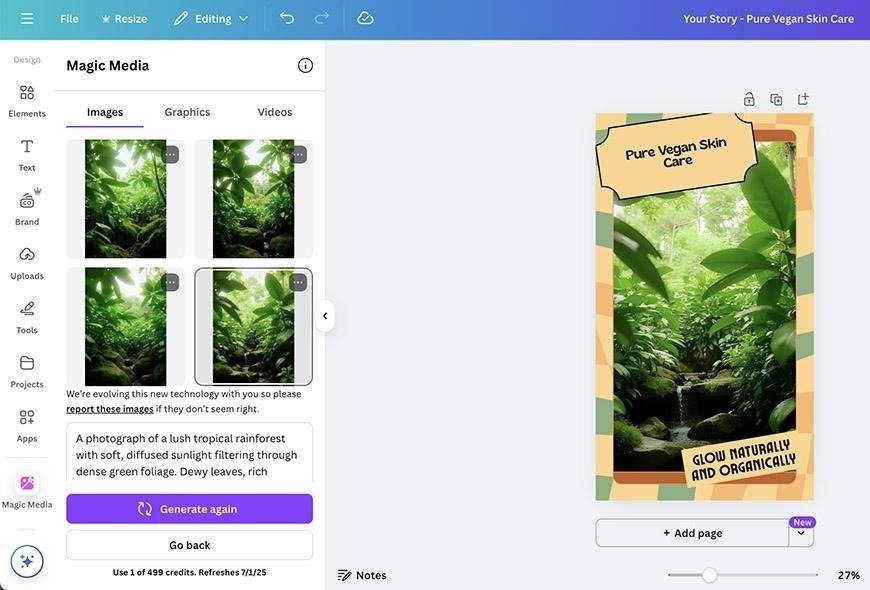
Canva is a practical choice for marketers who want to generate visuals and turn them into finished social media advertisements within one design editor.
Its AI-assisted design features and ready-made templates help users create promotional graphics without advanced graphic design skills. You can combine generated visuals with headlines, product photos, brand colors, logos, and calls to action.
Best features:
- AI-assisted image creation and editing.
- Templates for social media advertising.
- Editable text, shapes, and promotional layouts.
- Brand kits and reusable design elements on supported plans.
- Resizing and export options for different placements.
Best for: Small businesses, freelancers, social media managers, and beginners.
Limitations: Some AI features have usage limits or require a paid plan. Generated images may also need manual editing to achieve a professional advertising layout.
Example use case: Create a square product promotion for an Instagram feed, then adapt the design for a vertical Story advertisement.
Explore Canva.
2. Adobe Firefly — Best for Professional Marketing Visuals
business.adobe.com
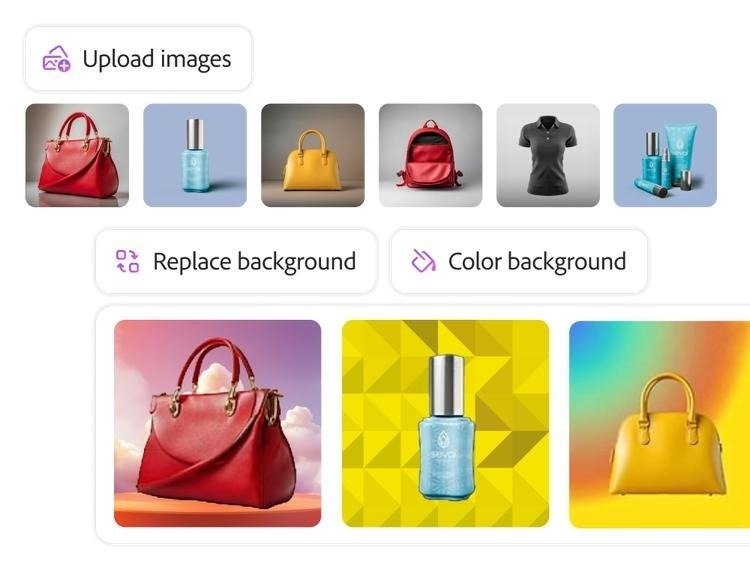
Adobe Firefly is designed for AI-assisted image generation and editing, making it useful for businesses that need polished visuals for advertising campaigns.
Its generative features can help create backgrounds, expand images, remove unwanted elements, and develop alternative compositions. Integration with Adobe’s creative ecosystem can also support more detailed editing workflows.
Best features:
- Text-to-image generation.
- Generative Fill and image expansion.
- Background and composition editing.
- Integration with supported Adobe applications.
- Creative workflows for product and campaign visuals.
Best for: Marketing teams, designers, agencies, and brands that require greater control over image editing.
Limitations: Advanced features may require a subscription or credits. Businesses should review the applicable commercial-use terms rather than assuming every output has the same legal protections.
Example use case: Generate a lifestyle background for a skincare product and refine the composition before adding approved promotional text.
Explore Adobe Firefly.
3. Midjourney — Best for High-Impact Creative Concepts
medium.com
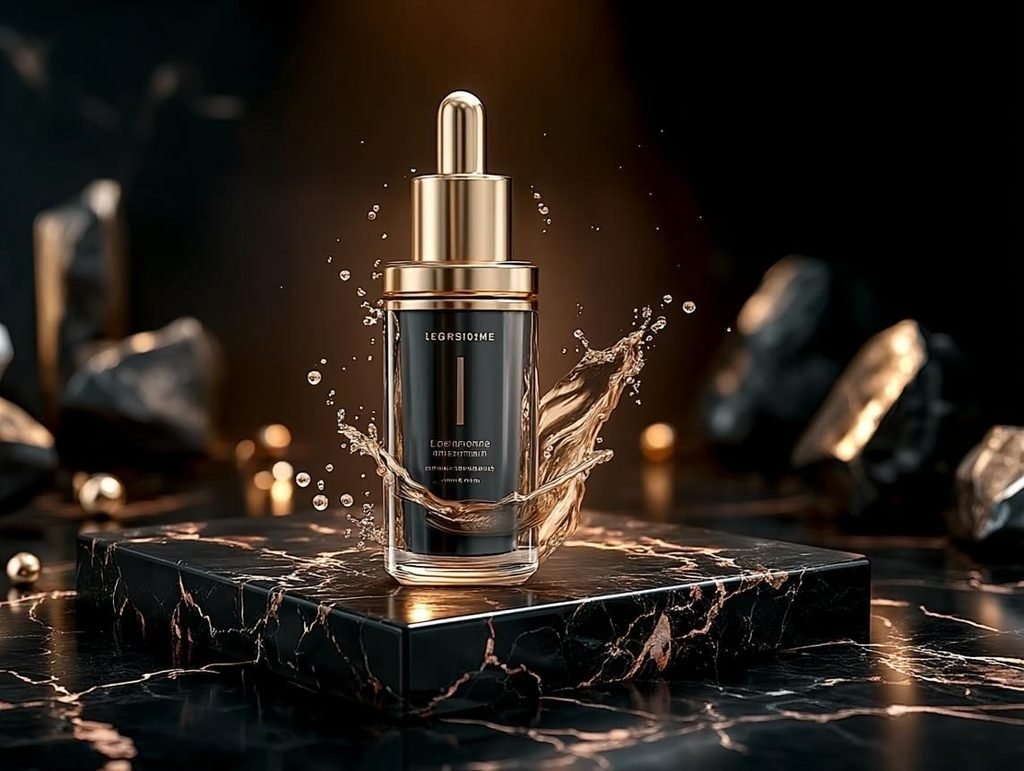
Midjourney is known for visually distinctive, detailed, and stylized image generation. It can help marketers develop imaginative campaign concepts that stand out from ordinary stock photography.
The tool is particularly useful when a brand needs a specific mood, visual style, or artistic direction. Carefully written prompts and reference images can help guide the output.
Best features:
- Detailed artistic image generation.
- Wide range of visual styles.
- Creative product and lifestyle concepts.
- Reference-based creative direction.
- Multiple visual options for campaign brainstorming.
Best for: Fashion brands, lifestyle campaigns, creative agencies, and businesses seeking distinctive visuals.
Limitations: Generated text may require correction, and achieving a precise brand style can take several iterations. Additional editing may be needed to create a finished advertisement.
Example use case: Develop several premium-looking campaign concepts for a fragrance brand before selecting a direction for the final ad.
Explore Midjourney.
4. Ideogram — Best for Text-Heavy Advertising Graphics

1001fonts.com
Ideogram is worth considering when an advertisement depends on prominent text, such as a sale headline, product slogan, or promotional message.
AI-generated lettering can still contain errors, but Ideogram’s focus on text within images makes it a useful option for typography-heavy creative concepts.
Best features:
- Image generation with text-focused prompts.
- Promotional graphic concepts.
- Typography-led visual designs.
- Multiple creative variations.
- Browser-based workflow.
Best for: Discount campaigns, event promotions, quote graphics, and text-led social media advertisements.
Limitations: Complex text, exact product details, and brand-specific fonts should always be checked. For better accuracy, create the background first and add the final text using an editable design tool.
Example use case: Create a visual concept for a seasonal sale and add the final approved discount and call to action in Canva.
Explore Ideogram.
5. Leonardo AI — Best for Brand and Character Consistency
saasworthy.com
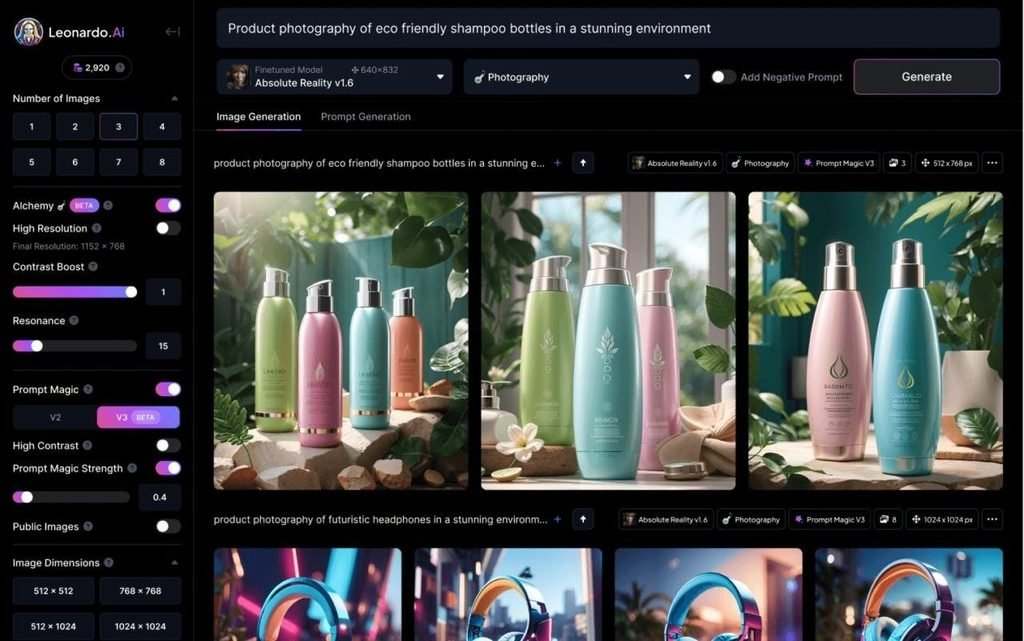
Leonardo AI provides image-generation and editing features that can help marketers create consistent visual styles across multiple campaign assets.
Reference images and supported customization features can be useful when a business wants recurring characters, a recognizable visual style, or a collection of related creative concepts.
Best features:
- AI image generation and editing.
- Reference-guided creative workflows.
- Multiple styles and visual concepts.
- Tools for refining generated assets.
- Options for creating related campaign visuals.
Best for: E-commerce brands, content creators, and businesses producing recurring social campaigns.
Limitations: Consistency is not guaranteed, especially when product details, faces, or complex compositions change. Review each image before using it in a live campaign.
Example use case: Develop a coordinated set of promotional visuals featuring a similar character, setting, and color palette.
Explore Leonardo AI.
6. ChatGPT Image Generation — Best for Prompt-Based Editing

chatgptimages.app
ChatGPT’s image-generation capabilities can help users create visuals through natural-language instructions and refine them through follow-up requests.
Instead of adjusting each detail manually, you can describe the desired image, request a different background, modify the composition, or explore alternative creative directions. The available image features and usage limits depend on the product and plan.
Best features:
- Image generation from text descriptions.
- Conversational editing and refinement.
- Changes to backgrounds and visual composition.
- Support for exploring different creative directions.
- A workflow that combines brainstorming and image creation.
Best for: Entrepreneurs, marketers, and small businesses that want to develop advertising concepts through simple instructions.
Limitations: Outputs may still need professional editing, and exact product packaging or text can require careful verification.
Example use case: Request three visual directions for a fitness product advertisement, compare them, and refine the strongest concept.
Explore ChatGPT.
7. AdCreative.ai — Best for Creating Multiple Ad Variations
semrush.com
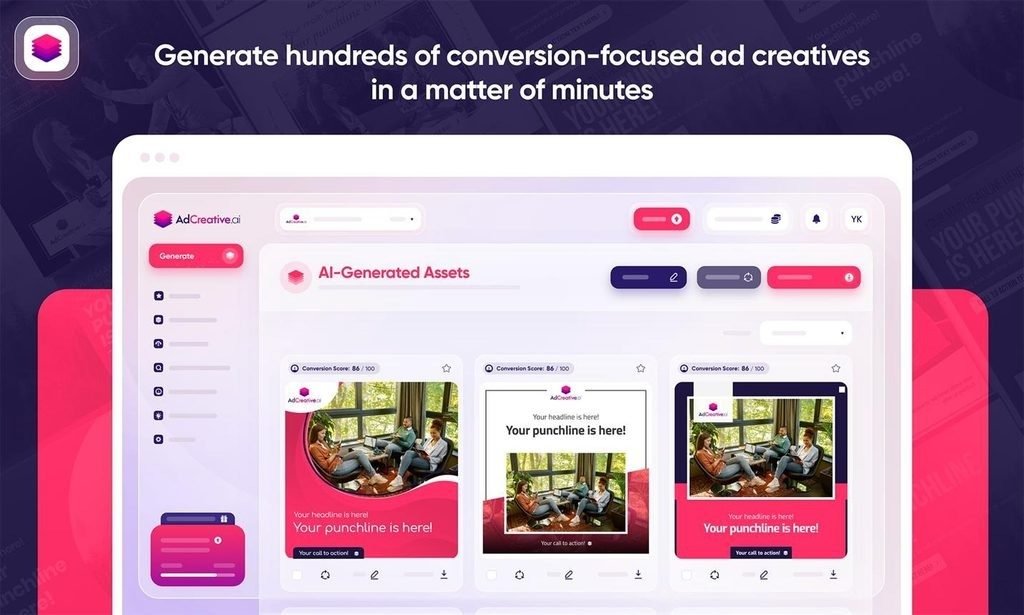
AdCreative.ai focuses on advertising creative production rather than only general-purpose image generation. Its workflow is useful for businesses that need multiple advertising concepts, layouts, and variations.
Depending on the plan and available features, users can create ad visuals, develop accompanying copy, and use creative-analysis features to support their testing process.
Best features:
- AI-assisted advertising creative generation.
- Multiple ad concepts and variations.
- Promotional layouts for supported platforms.
- Ad copy and headline assistance.
- Creative analysis features on supported plans.
Best for: Performance marketers, e-commerce businesses, agencies, and teams producing ads at scale.
Limitations: Predicted creative scores do not guarantee real campaign performance. Subscription costs, credits, and available integrations should be checked before choosing a plan.
Example use case: Develop multiple visual concepts for a product campaign, then test selected versions using actual advertising performance data.
Explore AdCreative.ai.
Comparison Table: Best AI Image Generation Tools for Social Media Ads
| Tool | Best For | Key Advantage | Main Limitation |
| Canva AI | Beginners and marketers | Editable designs and templates | Some features have usage limits |
| Adobe Firefly | Professional creative work | Detailed image editing | Advanced features may cost extra |
| Midjourney | Artistic advertising concepts | Distinctive visual styles | May need additional editing |
| Ideogram | Text-heavy graphics | Text-focused image generation | Exact text still needs checking |
| Leonardo AI | Consistent campaign visuals | Reference-guided creation | Consistency is not guaranteed |
| ChatGPT | Conversational creation | Natural-language refinement | Final outputs need review |
| AdCreative.ai | Advertising variations | Ad-focused creative workflow | Performance predictions are not guarantees |
The best option depends on what you need to create. Canva is a convenient starting point for editable graphics, Midjourney suits artistic concepts, and AdCreative.ai is worth exploring when producing multiple ad variations is the priority.
How to Choose the Best AI Image Generators for Social Media Ads
Selecting a tool based on popularity alone can lead to unnecessary expenses. Instead, evaluate the tool against your campaign requirements.
1. Define Your Advertising Goal
Decide whether you need product photography, lifestyle imagery, promotional banners, brand storytelling, or creative variations for testing.
A product advertisement may require accurate packaging and realistic lighting, while a campaign promoting a creative service may benefit more from imaginative illustrations.
2. Check Image Quality and Product Accuracy
A visually attractive image is not necessarily an effective advertisement. Make sure product shape, packaging, colors, proportions, and other important details are accurate.
When the product itself must be represented precisely, consider using an authentic product photograph as a reference rather than relying entirely on generated imagery.
3. Choose Tools That Match Your Budget
AI image generation tools may offer free access, monthly subscriptions, credits, or usage-based pricing. Compare the number of usable images you can realistically create rather than focusing only on the advertised starting price.
For a small business, a free or low-cost plan may be enough to validate a campaign concept before investing in more advanced features.
4. Review Commercial-Use Terms
Before publishing AI-generated images in paid advertising, review the tool’s current terms, applicable licensing conditions, and any restrictions affecting commercial use.
Avoid using protected logos, recognizable copyrighted characters, or another brand’s distinctive creative assets without appropriate authorization. For important campaigns, consider legal advice where necessary.
5. Evaluate Workflow and Editing Options
The ideal tool should fit the rest of your process. Check whether you can export the required dimensions, edit text, maintain brand colors, collaborate with a team, and create alternative formats without unnecessary manual work.
How to Create AI-Generated Visuals for Social Media Marketing
A repeatable workflow can make your creative production more efficient while reducing errors.
Step 1: Write a clear creative brief. Identify your audience, product, advertising objective, key benefit, visual style, and intended platform.
Step 2: Generate several concepts. Use the same brief to create different compositions, backgrounds, or visual approaches.
Step 3: Select the strongest image. Choose a visual that communicates the product or offer clearly rather than simply looking impressive.
Step 4: Add accurate advertising copy. Use an editable design tool when exact headlines, prices, disclaimers, or calls to action are important.
Step 5: Adapt the image to the placement. Prepare suitable versions for feed posts, vertical Stories, Reels covers, and other supported placements. Check the current specifications of the advertising platform.
Step 6: Review the final creative. Confirm spelling, product accuracy, readability, brand consistency, and compliance with relevant advertising policies.
Step 7: Test and improve. Compare different concepts using actual campaign metrics, such as click-through rate, conversions, and cost per acquisition.
Best AI Tools for Facebook and Instagram Ad Creatives
Facebook and Instagram advertisements often require different formats and creative approaches. A square image may work well in a feed placement, while a vertical design may be more suitable for Stories or Reels.
Canva AI can help create editable assets for these placements. Adobe Firefly can support image editing and background expansion, while Ideogram can help develop text-focused creative concepts. AdCreative.ai may be useful when a team needs to produce several advertising variations.
Regardless of the tool, check the current placement requirements and preview each advertisement before publishing. Important text should remain readable, the offer should be clear, and the visual should match the destination page.
AI Ad Creative Tools for Small Businesses: Are They Worth It?
AI ad creative tools can be valuable for small businesses that need more visual options but have limited time, design resources, or production budgets.
They can reduce the effort required to explore ideas, prepare product backgrounds, and create different layouts. However, a subscription is worthwhile only when the time saved and the quality of the usable output justify the costs.
Start with one product or service, generate a small selection of concepts, and measure the results of a controlled campaign. If the workflow saves time and produces useful creative, expand it gradually.
Common Mistakes to Avoid When Using AI Image Generation for Ads
Even advanced tools can produce unsuitable advertising assets. Avoid these common mistakes:
- Publishing without checking: AI may introduce inaccurate product details, distorted objects, or spelling errors.
- Using generic visuals: Images that do not reflect your audience or brand can make advertisements less distinctive.
- Ignoring mobile readability: Tiny headlines and crowded layouts may be difficult to read on phones.
- Assuming AI guarantees conversions: Creative tools cannot guarantee sales, leads, or a positive return on ad spend.
- Overlooking licensing: Check usage terms and avoid unauthorized use of protected creative assets.
- Creating too many similar variations: Test genuinely different concepts rather than making only minor cosmetic changes.
- Ignoring platform policies: Advertising images and claims must comply with the relevant platform’s current rules.
Future of AI Image Generation Tools for Social Media Ads in 2027
AI advertising workflows are likely to continue developing in areas such as creative personalization, reference-based editing, brand consistency, and automated adaptation to different placements.
Businesses may increasingly combine image generators with tools for copywriting, campaign planning, analytics, and publishing. This could make it easier to move from a product brief to a coordinated set of advertising assets.
However, better automation will not eliminate the need for human judgment. Product accuracy, clear messaging, originality, customer trust, and campaign measurement will remain essential.
For 2027 planning, focus on tools that fit your workflow, offer suitable editing controls, and make it easy to review outputs before publication. Reassess pricing, licensing, and features regularly as providers update their products.
Frequently Asked Questions
What are the best AI image generation tools for social media ads in 2026–2027?
Canva AI, Adobe Firefly, Midjourney, Ideogram, Leonardo AI, ChatGPT, and AdCreative.ai are useful options for different advertising needs. Compare them according to image quality, editing flexibility, budget, and the type of campaign you want to create.
Which AI tool is best for Facebook and Instagram ad creatives?
Canva AI is a practical option for editable social media graphics, while Adobe Firefly can help with image editing and Ideogram can support text-focused creative concepts. The right choice depends on your design requirements and workflow.
Are there free AI tools for creating social media ad images?
Some providers offer free plans or limited free usage, but available features, credits, and commercial-use conditions vary. Check the official terms before using generated images in advertising campaigns.
Can AI-generated images be used in paid social media ads?
AI-generated images may be used in paid advertising when the relevant tool’s terms, rights, and platform policies permit it. Review commercial-use conditions, verify image accuracy, and avoid unauthorized protected material.
Do AI-generated advertising images increase conversions?
Not automatically. AI can make it easier to produce and test creative variations, but conversion performance depends on factors such as the offer, audience, creative quality, targeting, and landing page.
What is the best AI ad creative tool for small businesses?
Canva AI is a convenient starting point for small businesses that need editable graphics and templates. Businesses that need large numbers of ad variations may also consider an advertising-focused platform such as AdCreative.ai.
What image sizes should I use for social media advertisements?
Image dimensions depend on the platform and placement. Square visuals are commonly used for feed placements, while vertical assets are often appropriate for Stories and Reels. Always confirm the latest requirements in the relevant advertising platform before exporting.
How can I make AI-generated ad images look more professional?
Use a clear creative brief, provide accurate product references, maintain consistent brand colors, keep the composition simple, and add final text using an editable design tool. Review the finished image on a mobile screen before publishing.
Conclusion
The best AI image generation tools for social media ads 2026–2027 are the ones that help you create accurate, engaging, and brand-appropriate visuals within your budget.
Canva AI is a strong starting point for editable designs, Adobe Firefly supports detailed image editing, Midjourney offers distinctive creative concepts, and Ideogram is useful for text-focused graphics. Leonardo AI, ChatGPT, and AdCreative.ai provide additional options for reference-guided creation, conversational refinement, and advertising-focused workflows.
Start with a clear campaign goal, test a small number of distinct concepts, and measure real results before expanding production. AI can make advertising creative easier to produce, but thoughtful strategy and careful review are what turn those visuals into useful marketing assets.