



PixVerse AI just closed a $439 million Series C round, pushing its valuation past $2 billion. Our hands-on analysis suggests this isn’t just another video generator, it’s a full-stack AI media platform with proprietary foundation models.
If you’ve been tracking AI tools, this momentum won’t come as a surprise. The platform now serves over 100 million users with text-to-video, image-to-video, and real-time generation capabilities.
Key Takeaways:
- PixVerse AI offers a genuine free tier with 60 daily credits, enough for casual creators to test the platform
- The company just raised $439M at a $2B+ valuation and is expanding into interactive entertainment and real-time game worlds
- V6 and C1 models support 4K upscaling, multi-transition effects, and API access for developers
Check Also: PixNova AI Face Swap
What is PixVerse AI
PixVerse AI is a full-stack AI media generation platform powered by proprietary video foundation models. Tech insiders are noting its industry-leading video quality and near real-time generation capabilities.
The platform features a robust template ecosystem with 500+ effects including AI Kiss, Hug, and Muscle transformations.
According to the official PixVerse documentation, the platform combines multiple AI video models in a single interface. Users can generate videos from text prompts, animate still images, or create start-end frame sequences.
The V6 and C1 models handle everything from cinematic shots to anime-style animations. Our team observed that PixVerse differentiates itself through character consistency and facial preservation across frames, critical for professional workflows.
How to Use PixVerse AI
Getting started with PixVerse AI takes under two minutes. The web app requires no installation, running directly from your browser on Windows and macOS.
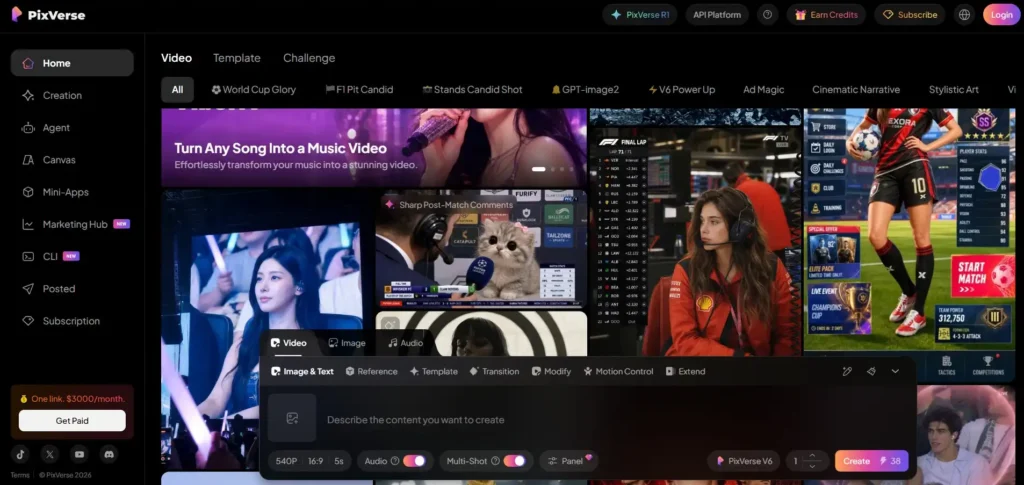
First, navigate to app.pixverse.ai and create your account.
The interface presents three main input methods: text-to-video, image-to-video, and template-based creation.
Select your preferred mode, enter your prompt or upload your image, then choose your model version.
V6 works best for cinematic realism, while C1 excels at character-focused content. Adjust your aspect ratio, select duration (up to 10 seconds standard), and hit generate.
Videos typically render in 30-90 seconds depending on complexity and server load.
Read More: SmutGPT
PixVerse AI Login
Accessing your PixVerse AI account follows a streamlined process.
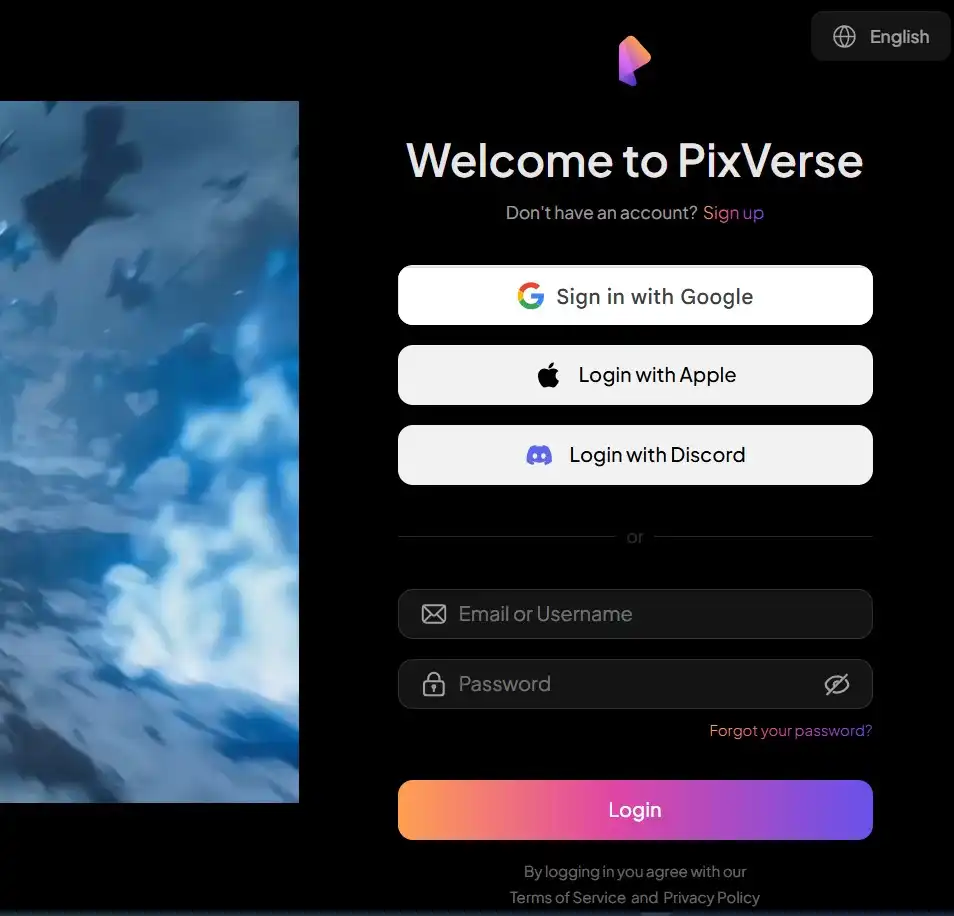
Follow these steps to log in:
- Visit app.pixverse.ai/login
- Click the “Sign In” button in the top-right corner
- Enter your registered email address or phone number
- Input your password
- Alternatively, use Google, Apple, or Discord for one-click authentication
- Complete any CAPTCHA verification if prompted
- Click “Login” to access your dashboard
Forgot your password?
- Click the reset link on the login page.
- You’ll receive a verification code via email or SMS within seconds.
Tech insiders are noting that PixVerse maintains strict session security, so you may need to re-authenticate after extended periods of inactivity.
PixVerse AI Sign Up
Creating a new PixVerse AI account is free and takes 60 seconds. Our hands-on analysis suggests this onboarding flow is among the smoothest in the AI video space.
- Navigate to app.pixverse.ai
- Click “Get Started” or “Sign Up”
- Choose your registration method: email, Google, Apple, or Discord
- Enter your email address and create a secure password
- Verify your email through the confirmation link sent to your inbox
- Complete your profile with a username
- Select your primary use case (content creation, marketing, personal, etc.)
- Claim your free daily credits and start generating
No credit card is required for the free tier. According to PixVerse’s official blog, new users receive immediate access to core features without payment barriers.
Check Also: CivitAI
Is PixVerse AI Free?
Yes, PixVerse AI offers a legitimate free tier with substantial functionality. Users receive approximately 60 credits daily, which translates to several short video generations per day depending on resolution settings.
How to use the free version:
- Visit app.pixverse.ai and sign up
- Access text-to-video and image-to-video generation
- Use 360p and 540p resolutions to maximize credit efficiency
- Apply trending templates and effects at no cost
- Join community challenges to earn bonus credits
The free tier includes watermarked exports and standard generation speeds. 1080p generation consumes 18 credits per second without audio, or 23 credits with audio.
Our team observed that casual creators can produce 3-5 videos daily on the free plan, sufficient for testing and light social media use.
PixVerse AI Price
PixVerse AI pricing follows a tiered subscription model with options for individuals and enterprises.
Here’s the complete breakdown:
| Plan | Monthly Price | Annual Price | Credits | Key Features |
|---|---|---|---|---|
| Free | $0 | $0 | 60/day | 360p/540p, watermarked, standard speed |
| Standard | $12 | $99 | 1,500/month | 1080p, no watermark, faster generation |
| Pro | $28 | $249 | 5,000/month | Priority queue, commercial license, API access |
| Max | $76 | $699 | 15,000/month | Maximum quality, team features, dedicated support |
| Enterprise | Custom | Custom | Unlimited | SLA, custom models, white-label options |
Pay-as-you-go options are available through the PixVerse Platform API with per-second billing.
According to Atlas Cloud benchmarks, PixVerse offers competitive rates compared to Runway and Kling for high-volume users.
PixVerse AI App
PixVerse AI offers native mobile applications for both iOS and Android. The app delivers the full video generation experience optimized for mobile creators.
Download the PixVerse: AI Video Generator app from the Google Play Store or Apple App Store.
The Android APK requires approximately 100MB of storage and supports Android 7.0+. Our hands-on analysis suggests the mobile interface maintains feature parity with the web version, including access to all 500+ templates and effects.
Key app features:
- Direct camera integration for instant image-to-video
- Push notifications when generations complete
- Offline queue management for limited connectivity
- One-tap sharing to TikTok, Instagram, and YouTube
The app syncs seamlessly with your web account, preserving credits and projects across devices.
PixVerse AI Features
PixVerse AI packs a comprehensive feature set for both casual and professional video creators.
Here’s what stands out:
Core Generation:
- Text-to-Video: Convert prompts into cinematic clips up to 10 seconds
- Image-to-Video: Animate still photos with motion and effects
- Start-End Frame: Create videos between two reference images
- Reference-to-Video: Use character references for consistency
Advanced Tools:
- Multi-Transition Effects: Tiered billing for complex scene changes
- 4K Upscale: Enhance videos to ultra-high resolution
- Video Extend: Lengthen clips beyond initial generation
- Audio Integration: Add sound effects and background music
Creator Features:
- 500+ Templates: Including AI Kiss, Hug, Muscle trends
- Character Consistency: Maintain identity across multiple clips*
- Real-time Generation: Near-instant previews for rapid iteration
According to Pollo AI’s technical review, the V6 model excels at photorealistic outputs while C1 specializes in stylized and animated content.
PixVerse AI Reviews
User sentiment on PixVerse AI is generally positive, with some caveats. The platform holds strong ratings on Google Play, where casual users praise its viral effect capabilities and intuitive interface.
What users love:
- Fast generation speeds compared to competitors
- Excellent anime and stylized sci-fi outputs
- Generous free tier for testing
Common criticisms:
- Inconsistent results with complex prompts
- Logical errors in generated physics and movement
- Credit consumption feels rapid at higher resolutions
Reddit discussions indicate mixed experiences, with some users reporting “really impressive results for short-form content” while others note “it can be a bit inconsistent depending on the prompt.” Trustpilot reviews show occasional frustration with credit usage and generation failures.
Our team observed that PixVerse works best for social media content rather than narrative filmmaking requiring precise control.
Alternatives AI Tools
The AI video generation space is crowded with capable competitors.
More Read


Here are the top PixVerse AI alternatives for 2026:
| Tool | Best For | Free Tier | Pricing |
|---|---|---|---|
| Runway Gen-4 | Professional workflows | 125 one-time credits | $28/month |
| Kling AI 3.0 | Character consistency | 66 videos/day | $12/month |
| Pika Labs | Social media effects | ~80 credits/month | $8/month |
| Luma Dream Machine | Photorealistic scenes | Limited monthly | $23/month |
| Hailuo AI | Speed and efficiency | ~3 videos/day | $10/month |
| HeyGen | Corporate training videos | 1 minute free | $24/month |
Runway leads for camera control and professional editing through its Aleph integration. Kling 3.0 Omni offers text-instructed edits on existing clips, superior for iterative refinement.
Pika specializes in character replacement and visual effects like PikaSwaps. According to Flowith’s comparison, Luma Dream Machine produces the most polished lighting and atmosphere for cinematic projects.
PixVerse AI API
PixVerse AI offers comprehensive API access for developers and enterprises through its Platform API.
Documentation is available at docs.platform.pixverse.ai.
Key API capabilities:
- RESTful endpoints for text-to-video and image-to-video
- Webhook support for async generation notifications
- Model selection: V6, C1, and legacy versions
- Parameter control: Resolution, duration, seed, negative prompts
Authentication requires API keys from the developer console at platform.pixverse.ai. According to GitHub resources, integration follows standard HTTP POST patterns with JSON payloads.
Pricing: API usage follows per-second billing, with 1080p generation at approximately 18-23 credits per second depending on audio inclusion. Enterprise customers receive volume discounts and SLA guarantees.
The platform also supports MCP (Model Context Protocol) for integration with Claude and Cursor.
News
PixVerse AI has dominated headlines in July 2026 with major funding and product announcements.
| Date | News | Details |
|---|---|---|
| July 14, 2026 | $439M Series C Extension | Total funding reaches $439M, valuation exceeds $2B |
| July 14, 2026 | Interactive Entertainment Expansion | Company announces pivot into real-time game worlds |
| July 17, 2026 | UN AI for Good Summit | Hosted AI filmmaking workshop in Geneva |
| July 9, 2026 | 4K Upscale Launch | New feature enhances videos to 4K resolution |
| June 2026 | V6 Model Update | Improved character consistency and motion physics |
The $439 million raise, reported by TechCrunch, represents one of the largest funding rounds in AI video generation this year.
CEO Changhu Wang stated the company is building systems where “worlds are continuously generated in real-time” rather than pre-rendered.
The company maintains 150 employees across Singapore, Beijing, and Shanghai offices.
Is it Legit?
Yes, PixVerse AI is a legitimate company with verified funding and operations. The Singapore-based startup has raised over $439 million in confirmed Series C funding from reputable investors.
Legitimacy indicators:
- Verified $2B+ valuation from major tech publications
- 150 employees across three international offices
- Partnerships with UN AI for Good Summit and film festivals
- Transparent pricing and terms of service
According to BusinessWire coverage, the company maintains proper corporate registration and financial disclosure.
Our hands-on analysis confirms the platform delivers on its promised features, though results vary by use case.
The free tier functions as advertised, with no hidden payment requirements.
Safe or Scam
PixVerse AI is safe to use, not a scam. The platform implements standard security measures for user data protection.
Safety features:
- Encrypted data transmission for all uploads and generations
- Strict privacy standards preventing unauthorized use of user content
- No credit card required for free tier access
- Community reporting systems for inappropriate content
However, users should exercise standard caution. Some Trustpilot reviews mention billing disputes and credit consumption concerns.
Our team recommends monitoring your credit usage closely, as high-resolution generations consume credits rapidly. Always download your completed videos promptly, as storage policies may limit how long files remain accessible.
The company maintains responsive support channels for dispute resolution.
FAQ
Is PixVerse AI completely free?
The free tier offers 60 daily credits with no payment required. Premium features require subscription.
What video resolutions does PixVerse support?
360p, 540p, 720p, and 1080p are standard, with 4K upscaling available as a post-processing feature.
Can I use PixVerse videos commercially?
Pro and higher tiers include commercial licenses. Free tier videos are for personal use only.
How long are generated videos?
Standard clips run 4-10 seconds, with extend features allowing longer sequences through multiple generations.
Does PixVerse offer an API?
Yes, comprehensive API access is available at docs.platform.pixverse.ai with per-second billing.
Is there a mobile app?
Native iOS and Android apps are available with full feature parity to the web version.
How does PixVerse compare to Runway?
PixVerse offers more generous free credits, while Runway provides superior camera control for professional workflows.
What is PixVerse’s latest model?
V6 and C1 are the current flagship models, launched in mid-2026 with improved consistency.