


If you feel like your calendar is constantly fighting against your actual to-do list, Reclaim AI might just be the missing piece of your productivity puzzle.
Our hands-on analysis suggests this platform is shifting how professionals manage time by treating your schedule as a dynamic, intelligent resource rather than a static grid.
It is essentially a virtual assistant that prioritizes your most critical work without you having to manually block every hour of the day.
BrainText AI Is This the Smartest Tool?
Key Takeaways
- Reclaim AI acts as an intelligent calendar assistant that automatically manages tasks, habits, and meeting blocks.
- The platform integrates deeply with Google Calendar and Microsoft Outlook to defend your focus time.
- While it offers a Free Lite plan, its most powerful features are optimized for team-based scaling.
What is Reclaim AI
Reclaim AI is an advanced calendar management tool powered by artificial intelligence.
Unlike traditional apps, it actively defends your time by scheduling tasks around your existing meetings.
It learns your preferences and priorities to make intelligent, autonomous decisions about your daily flow.
If a meeting gets added or canceled, it shifts your tasks automatically.
This ensures your calendar always reflects your real-world priorities without manual input.
Napkin AI Text into Visuals in 2026
How to Use Reclaim AI
Using Reclaim AI starts with connecting your primary calendar to their web dashboard.
Once synced, you define your Smart Habits and priority tasks.
The AI then finds the best time slots for these items based on your set working hours.
You can create Smart 1-on-1s and scheduling links to let others book time that works for everyone.
It functions seamlessly in the background to protect your deep work time from interruptions.
Reclaim AI Login
To access your workspace, follow these simple steps:
- Navigate to the official Reclaim AI website.
- Click the “Login” button located at the top right of the homepage.
- Choose the provider you used during registration, such as Google or Microsoft.
- Authenticate through your email provider to enter your personalized dashboard.
Pippit AI Is it the Top Tool for Your Video Strategy?
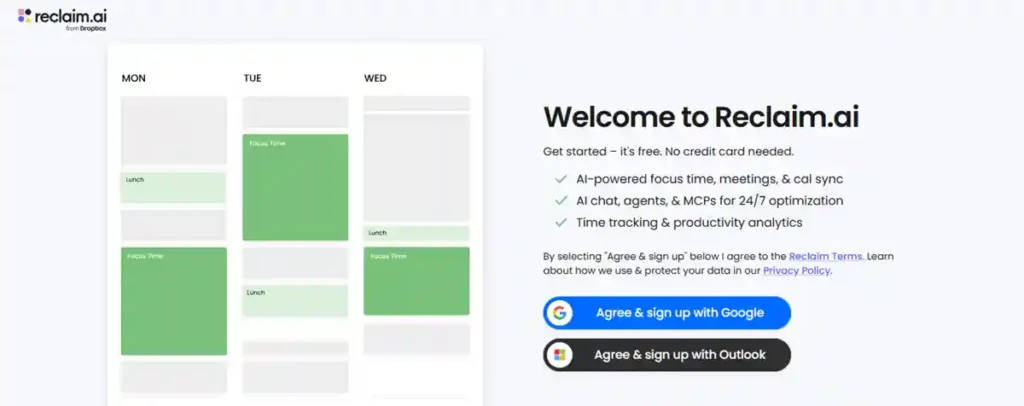
Reclaim AI Sign up
Getting started is a straightforward process:
- Visit the Reclaim AI website to begin the onboarding process.
- Click the “Get Started” or “Sign Up” button on the landing page.
- Connect your primary Google Calendar or Outlook account.
- Grant the necessary permissions for the tool to read and write to your calendar.
- Follow the quick setup wizard to configure your initial working hours and preferences.
Is Reclaim AI Free?
Yes, Reclaim AI offers a “Lite” plan that is completely free to use.
This plan is designed for individuals who need basic automation.
However, it comes with limitations, such as a cap of one habit, one scheduling link, and a restricted scheduling range.
While the free tier is a great starting point, power users often find the paid plans necessary for full functionality.
AutoDraft AI is Trending in Animation
Reclaim AI Price
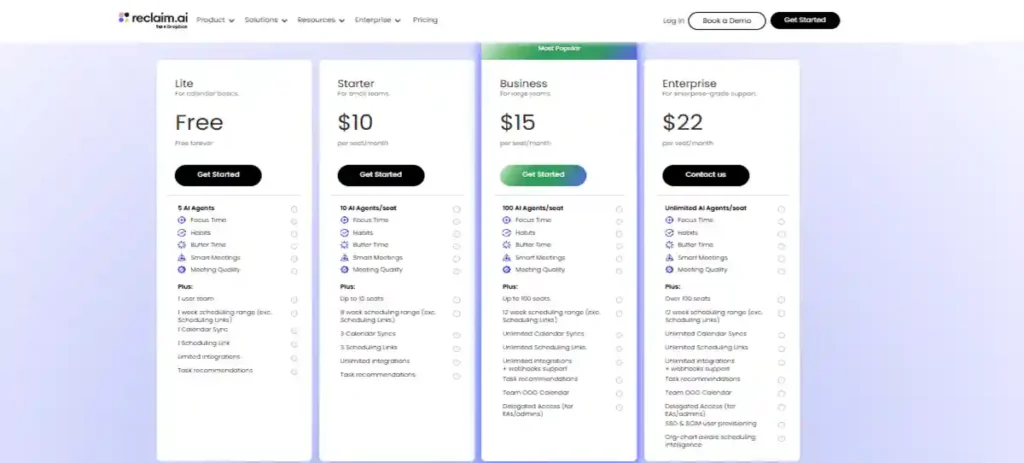
The platform uses a per-seat pricing model that scales with your needs.
| Plan | Monthly Cost | Annual Cost | Key Features |
| Lite | $0 | $0 | 1 Habit, 1 Link, 1-Week Range |
| Starter | $12/seat | $10/seat | 10 Seats, Unlimited Habits |
| Business | $18/seat | $15/seat | 100 Seats, Full Integrations |
| Enterprise | N/A | $22/seat | SSO, Custom Provisioning |
Reclaim AI App
It is important for users to note that Reclaim AI is primarily a web-based application.
There is currently no dedicated native mobile app or desktop software.
Users access the platform through their web browsers, which allows it to sync consistently with your existing calendar ecosystem.
While some competitors offer native mobile apps, Reclaim’s strength lies in its deep cloud integration.
meigen. ai: Pro AI Art Without the Prompting Hassle
Reclaim AI Features
Our team observed that the tool provides robust functionality for busy professionals.
- Smart Habits: Automatically blocks time for recurring routines.
- Task Scheduling: Prioritizes your to-dos based on deadlines.
- Buffer Time: Adds mandatory breaks between your meetings.
- No-Meeting Days: Protects specific days from incoming invites.
- Team Analytics: Provides insights into how your organization spends its time.
Reclaim AI Reviews
User feedback on platforms like G2 highlights the tool’s effectiveness in reducing “calendar Tetris”.
Tech insiders often praise the intuitive interface and the seamless way it handles task prioritization.
Some users have expressed desire for a native mobile experience, but the current web functionality is widely considered high-quality.
Overall, it remains a top-rated tool for those struggling to balance work-life commitments.
Alternatives AI Tools
If you are exploring other options, consider these alternatives:
- Motion: A comprehensive suite that includes AI project management and team collaboration.
- FlowSavvy: Known for a better native mobile experience for individual users.
- SkedPal: Offers high levels of customization for complex scheduling needs.
- Morgen: A great dedicated calendar app for those who prefer a “human-in-the-loop” approach.
Reclaim AI API
Reclaim AI provides a robust API for developers looking to integrate the service into custom workflows.
The platform supports standard webhooks and offers an OpenAPI/Swagger specification for easier implementation.
Developers can explore these capabilities through the official developer portal to automate calendar events and task management programmatically.
Check the official documentation on their website for the most recent updates on API rate limits and endpoints.
Antigravity AI Coding Workflow
News
In recent months, Reclaim AI has focused on expanding its compatibility with Outlook, broadening its reach beyond the Google ecosystem.
Industry analysts are noting that the tool is increasingly being adopted by mid-sized firms looking to improve meeting hygiene.
Keep an eye on their official status page for upcoming feature releases and stability updates.
Is it Legit?
Yes, Reclaim AI is a legitimate productivity platform used by thousands of professionals and teams globally.
It operates with clear pricing, professional documentation, and transparent integration requirements.
Our research confirms it is a well-regarded player in the AI productivity space, consistently meeting its service promises.
Safe or Scam
Reclaim AI is a safe, reputable tool for managing your professional calendar.
It does not engage in deceptive billing and provides granular control over the data it accesses via OAuth permissions.
We always recommend reviewing the permissions you grant to any third-party app, but our analysis shows no red flags regarding data security or privacy practices.
FAQ
- Does Reclaim AI have a mobile app? No, it is a web-only platform.
- Can I use it with Outlook? Yes, it recently added support for Microsoft Outlook.
- Does it delete my calendar events? No, it only adds, moves, or manages events based on your set priorities.
- Is there a discount for students? Yes, they offer 50% off for students and educators.
More info to Visit AI Tool Services