



Live interviews leave little room to freeze.
Sensei AI listens to your interviewer in real time and feeds you answer suggestions on-screen.
We tested it to see whether the free plan is enough, or whether the Pro tier earns its price.
Playbox AI : Trending in Tech Right Now
Key Takeaways
1 Sensei AI is a browser-based AI interview copilot with 11K+ users and a reported 96% success rate. 2 The Free Plan limits sessions to 15 minutes, while the Pro Plan costs $89/month or $24/month billed annually ($288/year). 3 It supports Zoom, Google Meet, and Microsoft Teams, but has no dedicated app and offers no refunds.
What is Sensei AI
Job seekers often lose points not from a lack of skill, but from nerves and blanking mid-answer.
Sensei AI is a real-time interview copilot built to reduce that gap.
It runs entirely in your browser at senseicopilot.com and listens to questions as they are asked.
The tool then suggests structured, tailored answers in under a second.
Our hands-on analysis suggests it fits candidates who want live support during the interview itself, rather than help finding roles.
How to Use Sensei AI
Using Sensei AI follows a short, repeatable setup.
| 1 | Upload your resume and personal stories so answers reflect your background. |
| 2 | Test the AI in the Playground to see how it responds to sample questions. |
| 3 | Configure settings to adjust the tone and formality of suggestions. |
| 4 | Join your live call and let Sensei AI generate answers as questions arrive. |
Keep the copilot in a separate browser window from your video call.
This helps reduce the risk of accidentally sharing it during a screen share.
Sensei AI Login (step-by-step)
Returning users can sign in quickly.
| 1 | Go to app.senseicopilot.com. |
| 2 | Click Log In in the top corner. |
| 3 | Enter the email and password tied to your account. |
| 4 | Confirm any verification prompt if requested. |
| 5 | Open your dashboard to start a Copilot session. |
Tech insiders are noting that browser-based tools like this avoid installs, which can matter on locked-down work laptops.
Emma Frost AI Chatbot : Free Guide & Review 2026
Sensei AI Sign Up (step-by-step)
New accounts take only a few minutes.
| 1 | Visit senseicopilot.com and select Try for free. |
| 2 | Register with your email or a connected account. |
| 3 | No credit card is required for the free tier. |
| 4 | Upload your resume to personalize responses. |
| 5 | Run a short test in the Playground before your first real interview. |
The free plan is best treated as an evaluation step, not a full interview aid.
Is Sensei AI Free?
Yes, Sensei AI offers a free plan with no payment needed.
The catch is the 15-minute session cap, which cuts off before most rounds finish.
Behavioral interviews often run 30 to 45 minutes, and technical screens can run longer.
So the free tier helps you judge answer quality and latency, but may not cover a full live interview.
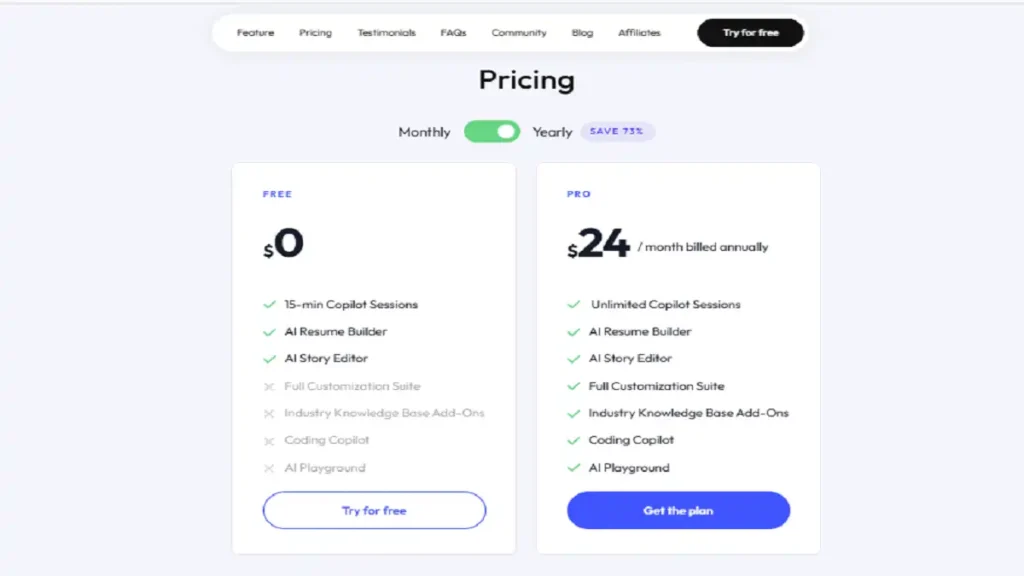
Sensei AI Price (comparison)
| Plan | Price | Session Length | Coding Copilot |
|---|---|---|---|
| Free | $0 | 15 min cap | Not included |
| Pro Monthly | $89/mo | Unlimited | Included |
| Pro Annual | $24/mo ($288/yr) | Unlimited | Included |
The annual plan cuts the effective rate by about 73%.
One important limit: Sensei AI issues no refunds on any plan, so test the free tier first.
Sensei AI App
Here is a distinction that affects your decision.
Sensei AI has no dedicated mobile or desktop app.
It runs only as a browser tab in Chrome or Edge.
This means no installation and instant updates, but it also requires careful window management during screen shares.
A misplaced full-desktop share could expose the tab, so keep it isolated.
Trump AI Voice Is Trending in AI Tools Right Now
Sensei AI Features
Our team observed the following capabilities:
| 1 | Real-time answer suggestions with under one-second latency. |
| 2 | AI Resume Builder and AI Story Editor for interview preparation. |
| 3 | Coding Copilot (Pro only) using ThoughtFlow technology, which shows reasoning steps instead of finished code. |
| 4 | Support for Zoom, Google Meet, and Microsoft Teams. |
| 5 | Available in 30+ languages for global candidates. |
| 6 | Answers are tailored based on your resume and target role. |
Sensei AI Reviews
Public sentiment appears limited but mostly positive.
Testimonials on the official site cite offers at firms like Google, Netflix, and McKinsey.
Independent coverage from loopcv.pro calls it a genuine interview tool, while flagging that reviews are still thin.
Pros
| 1 | Fast, tailored live suggestions. |
| 2 | No installation required. |
| 3 | Strong language coverage. |
Cons
| 1 | No refunds and a restrictive free usage cap. |
| 2 | No native app available. |
| 3 | Live assistance may raise honesty and ethical concerns. |
AI Reverse World Prompt : Things That Shouldn’t Make Sense
Alternatives AI Tools
If Sensei AI does not fit, consider these options:
| 1 | Final Round AI — Broad interview copilot with mock interviews and preparation tools. |
| 2 | Cluely — Desktop overlay solution, priced higher at approximately $149.99/month. |
| 3 | LockedIn AI — Browser-based interview assistant, around $29.99/month (quarterly plan). |
| 4 | InterviewMan — Native desktop applications with OS-level stealth features. |
| 5 | AceRound AI — Budget-friendly alternative, around $29.90/month. |
Sensei AI API
Sensei AI does not publish a public API or developer documentation as of 2026.
It is a consumer-facing tool, not a platform for integration.
If your business needs programmatic hiring support, tools like LinkedIn Talent Solutions may fit that requirement better.
News
The interview-copilot category keeps expanding through 2026.
Competitors are adding desktop stealth features and native mobile apps, areas where Sensei AI currently lags.
Coverage in the Harvard Business Review on AI in hiring suggests employers are also tightening detection and disclosure rules.
Is it Legit?
Yes, Sensei AI appears to be a real product, not a scam.
It has a live site, active users, and consistent third-party coverage.
That said, its claims like the 96% success rate are self-reported and should be treated with caution.
Safe or Scam
Sensei AI is safe in the technical sense, running as a standard browser tool.
The real risk is ethical, not security-based.
Real-time help during live interviews may breach some employers’ rules.
Treat it as a preparation and confidence aid, and confirm each employer’s policy before your session.
FAQ
How much does Sensei AI cost?
$89/mo monthly, or $24/mo billed annually at $288/yr. A free 15-minute tier exists.
Does it work on mobile?
Only through a mobile browser. There is no dedicated app.
Can interviewers detect it?
It stays hidden if you share only your video call window. Strict proctored platforms carry higher risk.
Does it offer refunds?
No. Test the free plan thoroughly before you upgrade.
If you are weighing a live interview tool, start with the free tier, run it at your real interview length, and confirm your employer’s rules before committing.