


TurboScribe AI is fundamentally transforming how professionals manage audio documentation in 2026.
By leveraging advanced Whisper AI technology, this tool converts complex audio and video into text with high precision.
Our hands-on analysis suggests it is a primary choice for users needing reliable, high-volume transcription services.
Vizard AI Elevating Content Creation
Key Takeaways
- TurboScribe AI offers a generous free tier with three daily transcriptions.
- It supports over 98 languages, making it a versatile global solution.
- Data privacy is a priority, with all files encrypted at rest.
What is TurboScribe AI
TurboScribe AI is a specialized, web-based transcription platform designed for high-speed speech-to-text conversion.
Unlike real-time meeting assistants, it focuses on processing uploaded media files—audio or video—with exceptional accuracy.
It utilizes the OpenAI Whisper engine to ensure that even technical terminology is handled effectively.
Digital experts often highlight its capability to manage long-form content, accepting files up to 10 hours in length.
It is an essential utility for researchers, journalists, and content creators who require clean, searchable transcripts from recorded sessions.
BrainText AI Is This the Smartest Tool?
How to Use TurboScribe AI
Using the platform is straightforward and requires no advanced technical skills.
First, navigate to their official website in your preferred web browser.
Click the “Transcribe File“ button to initiate the process.
Upload your audio or video file by dragging and dropping it into the designated area.
Select your source language and choose a transcription mode.
We recommend the “Whale” mode for the highest accuracy results.
Once processed, the tool provides a searchable, editable transcript that you can download in various formats like PDF, TXT, or SRT.
TurboScribe AI Login
Follow these steps to access your account:
- Visit the official TurboScribe AI website.
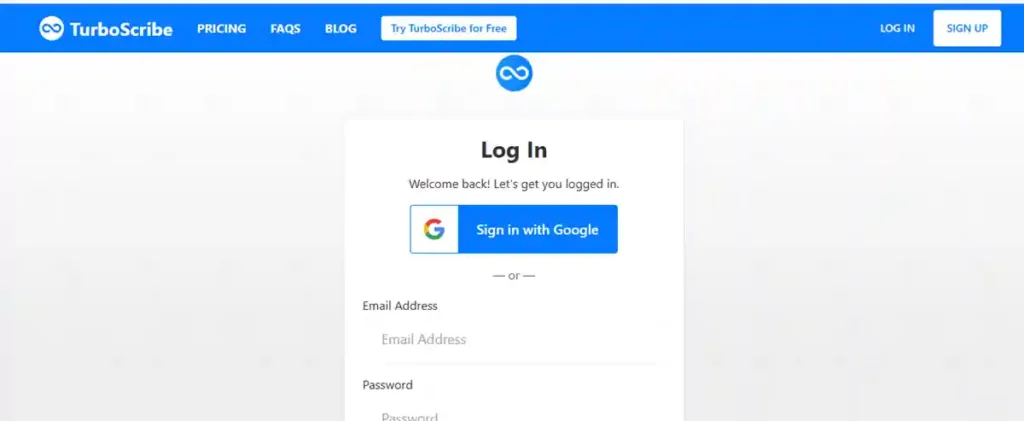
- Locate the “Login” button in the top navigation bar.
- Enter the email address associated with your account.
- If you registered using a social provider, select the Google login option.
- Click “Sign In” to access your dashboard and saved transcripts.Tech insiders note that keeping your browser credentials managed helps streamline this quick authentication process.
Napkin AI Text into Visuals in 2026
TurboScribe AI Sign up
Getting started with a new account is fast:
- Navigate to the TurboScribe AI homepage.
- Click the “Sign Up“ or “Start Transcribing for Free” button.
- Enter your email address to create a new profile.
- Verify your email if prompted by the platform.
- Alternatively, use the Google Auth integration for a one-click registration experience.You can immediately begin uploading your files after finalizing these simple steps.
Is TurboScribe AI Free?
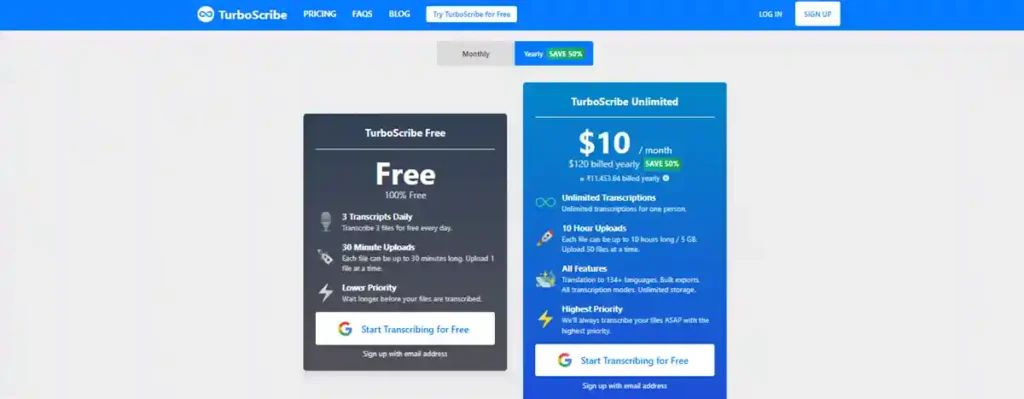
Yes, TurboScribe AI maintains a robust free tier for casual users.
You can transcribe up to three files every single day without providing credit card details.
Each of these free files can be up to 30 minutes in length.
This is an excellent option for students or professionals needing occasional transcriptions.
However, note that free files are processed at a lower priority compared to paid subscriptions.
Frequent users should consider the unlimited plan if daily volume exceeds these limitations.
TurboScribe AI Price
| Plan | Price (Billed Annually) | Price (Billed Monthly) | Key Benefit |
| Free | $0 | $0 | 3 Transcripts Daily |
| Unlimited | $10/month | $20/month | Unlimited Transcriptions |
The annual billing option offers significant savings for power users.
It covers unlimited transcriptions and faster processing speeds for all files.
Pippit AI Is it the Top Tool for Your Video Strategy?
TurboScribe AI App
TurboScribe AI does not have a native app in the Apple App Store or Google Play Store.
Instead, it utilizes a highly optimized mobile-friendly web interface.
You can access all features directly through your smartphone’s browser.
To improve accessibility, we recommend pinning the site to your home screen.
On iOS, tap the Share icon and select “Add to Home Screen”.
On Android, use the Chrome menu to select “Add to Home screen” for a seamless experience.
TurboScribe AI Features
- Multilingual Support: Transcribe audio in over 98 languages and translate to 134+.
- High-Capacity Uploads: Handle files up to 10 hours long or 5 GB.
- Bulk Exports: Efficiently download transcripts in multiple formats like DOCX, TXT, and SRT.
- Speaker Recognition: Automatically identify different voices within the recording.
- Secure Infrastructure: All files are encrypted at rest using industry-standard AES-256.
- No Model Training: Your data is never used to train external AI models.
TurboScribe AI Reviews
User feedback generally praises the tool for its accuracy and simple interface.
Many reviews highlight that it performs exceptionally well on technical terminology.
Early adopters often emphasize that the free tier is generous compared to competitors.
Some users have noted that performance may vary with heavily overlapping speech in noisy environments.
Overall, it holds a solid reputation for privacy-conscious professionals who prefer secure in-house processing.
Our team observed that its ability to handle large files makes it a standout in the current landscape.
AutoDraft AI is Trending in Animation
Alternatives AI Tools
If TurboScribe AI does not meet your specific needs, consider these alternatives:
- Otter.ai: Highly effective for live meeting integration and team collaboration.
- Fireflies.ai: Excellent for automated meeting summaries and CRM syncing.
- Happy Scribe: A strong competitor for those needing professional human-in-the-loop services.
- Sonix: Known for high-speed automated transcription and deep editing tools.
TurboScribe AI API
Currently, the platform focuses on a web-based user experience for individual creators and professionals.
While there is high demand for developer integration, the service does not offer a public API for external software automation at this time.
Users primarily interact with the tool through their browser dashboard.
We advise checking their official blog for any future updates regarding developer access or REST API endpoints.
News
Recent updates have centered on improving processing speeds and expanding translation capabilities.
The platform continues to prioritize security by keeping all transcription processes internal rather than relying on third-party services.
In 2026, the company is focusing on enhancing the GPT-integration feature, allowing users to “chat” with their uploaded media files to extract insights faster.
Market observers note that the platform remains stable while competitors often shift their core focus toward live meeting assistants.
meigen. ai: Pro AI Art Without the Prompting Hassle
Is it Legit?
Yes, TurboScribe AI is a legitimate, well-regarded service in the AI transcription space.
It is operated by TurboScribe Technologies, based in the United States.
The tool has been used by thousands of students, researchers, and content creators.
Transparent pricing and clear security protocols confirm its status as a reliable professional tool.
Our analysis shows it consistently delivers on the features promised in its subscription tiers.
Safe or Scam
TurboScribe AI is safe to use and demonstrates high standards for data security.
The platform uses HTTPS/SSL for all connections and ensures your files remain encrypted at rest.
They do not sell user data, nor do they train models on your private content.
Payments are processed through Stripe, ensuring your financial information is handled securely.
Security-focused users can trust the platform’s commitment to confidentiality.
FAQ
- Can I delete my files? Yes, you can delete files at any time, and they are permanently removed.
- Does it work with YouTube? Yes, it accepts YouTube links directly.
- Is it better than Otter? It depends on your needs; it is often more accurate for file-based transcription.
- Do they store my card info? No, all payments are managed via Stripe.
More info to Visit AI Tool Services